
In today’s fast-paced work environment, the physical setup of your workspace often dictates your long-term health outcomes. Many professionals overlook the subtle, cumulative impact of poor posture, leading to discomfort that evolves into chronic musculoskeletal issues. Conducting workplace ergonomic health assessments is a proactive approach that shifts the focus from reactive pain management to preventive wellness. By aligning your physical environment with the natural mechanics of the human body, you can improve focus, minimize fatigue, and support sustained cognitive productivity.
In this guide, we explore how to evaluate your desk configuration, integrate movement into your daily routine, and utilize biometric health data interpretation to make informed adjustments. Whether you are setting up a home office or refining a corporate station, these strategies empower you to take control of your physical well-being. By blending foundational ergonomic principles with modern lifestyle medicine coaching, you will learn how to transform your workstation into a foundation for lasting vitality and professional excellence.
1. Conducting Effective Workplace Ergonomic Health Assessments
Workplace ergonomic health assessments are more than just a box-checking exercise; they are a fundamental component of a sustainable corporate wellness program implementation. By systematically evaluating how an employee interacts with their physical environment, organizations can mitigate the risk of injury while boosting overall staff morale and operational efficiency.
1.1 The Science and Benefits of Human-Centered Workstations
Human-centered design focuses on the physiological realities of the human body. When a workstation is calibrated to the individual, the body can maintain a neutral posture, which significantly reduces the internal load on muscles and tendons.
1.1.1 Defining Musculoskeletal Disorders and Chronic Strain
Musculoskeletal disorders (MSDs) often develop insidiously due to repetitive micro-trauma. These conditions, which include carpal tunnel syndrome, tendonitis, and lower back pain, stem from prolonged static loading or awkward postures. Understanding these risks is essential for chronic disease self-management education, as it helps employees recognize that minor aches are often precursors to long-term clinical issues.
1.1.2 The Correlation Between Ergonomics and Cognitive Productivity
There is a direct link between physical comfort and cognitive performance. When an employee is free from the distraction of physical discomfort, they can sustain focus for longer periods. Proper ergonomics supports better circulation and oxygen flow, which in turn fuels the brain for complex problem-solving and creative tasks.
1.2 Step-by-Step Methodology for Comprehensive Health Assessments
A successful assessment requires a blend of observational data and employee feedback. By following a structured approach, you ensure no critical detail is overlooked.
1.2.1 Performing a Visual Audit of Desk Configuration
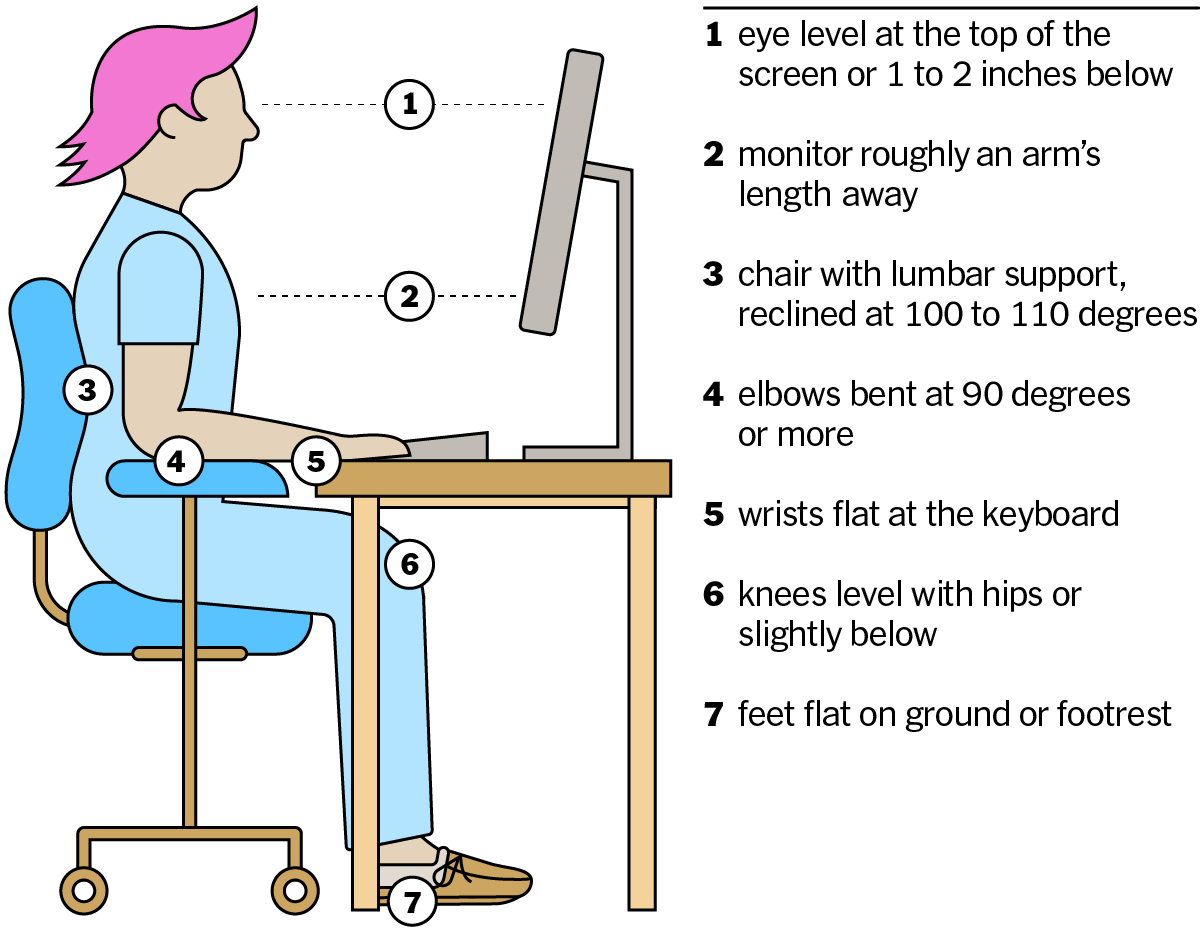
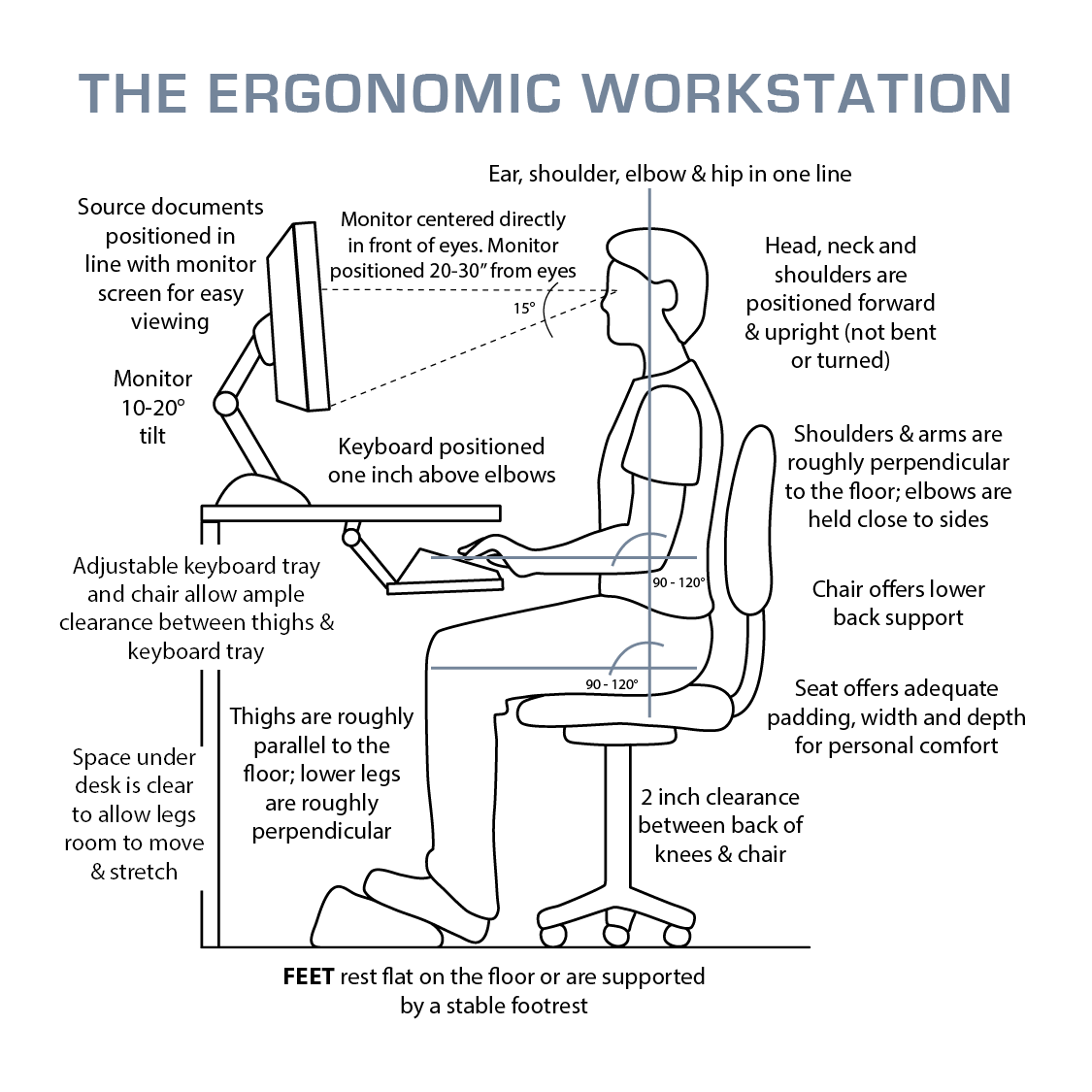
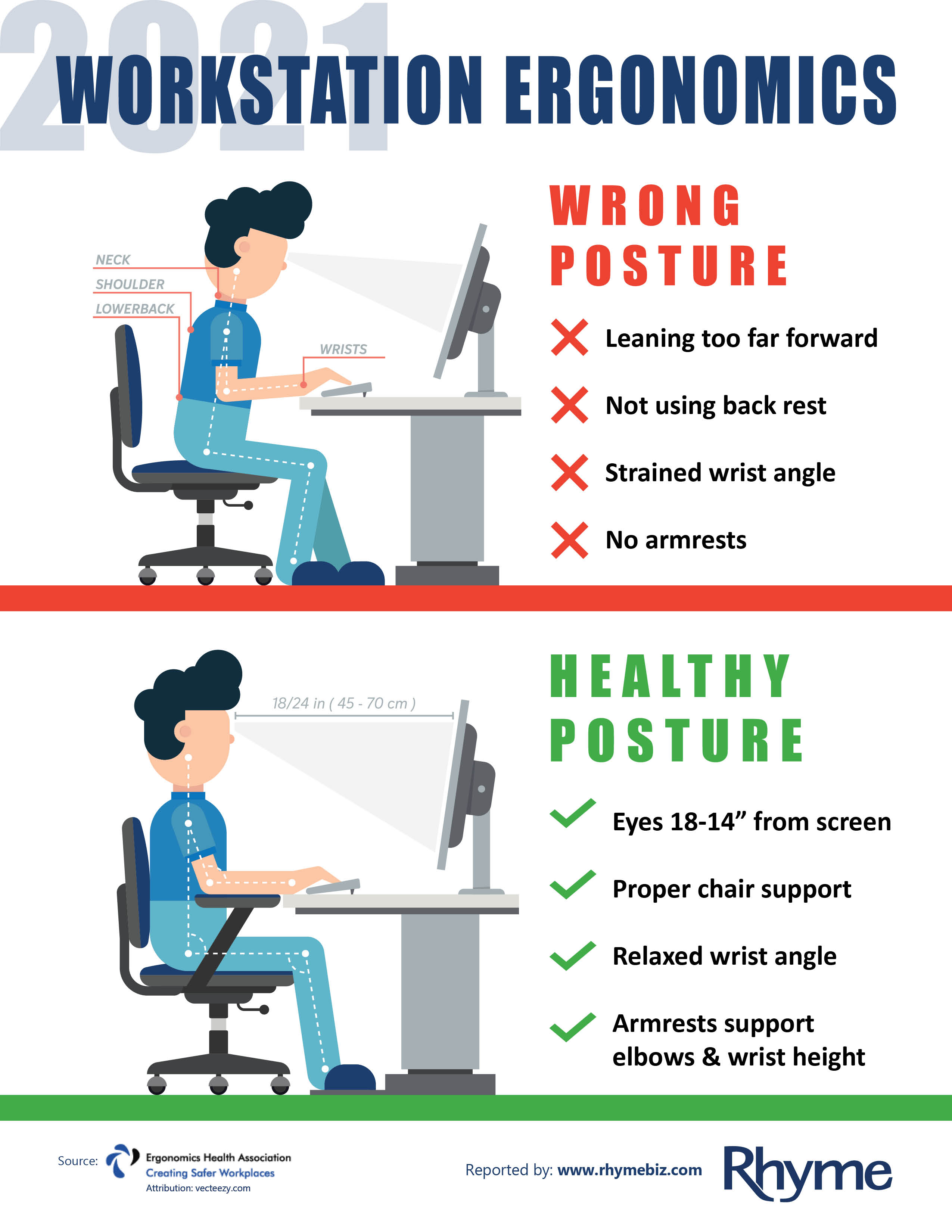
Start by observing the “neutral zone.” Ensure the employee’s feet are flat on the floor, thighs are parallel to the ground, and the back is supported. A visual audit should confirm that the workstation setup encourages a natural, relaxed posture rather than one that forces the body into unnatural angles.
1.2.2 Evaluating Dynamic Movement and Task Frequency
Static posture is often the enemy of comfort. Evaluate how often an employee switches tasks and whether their workstation allows for movement. High-frequency tasks should be located within easy reach to prevent excessive stretching or twisting, which can lead to fatigue over the course of an eight-hour shift.
1.2.3 Identifying Early Warning Signs of Physical Discomfort
Train employees to identify symptoms such as tingling in the fingers, neck stiffness, or localized muscle soreness. These are early warning signs that the current setup is not meeting their specific biomechanical needs.
1.3 Implementing Corrective Actions and Environmental Adjustments
Once you identify issues, focus on low-cost, high-impact changes that optimize the user’s interface with their equipment.
1.3.1 Optimizing Neutral Spine Alignment with Chair and Lumbar Support
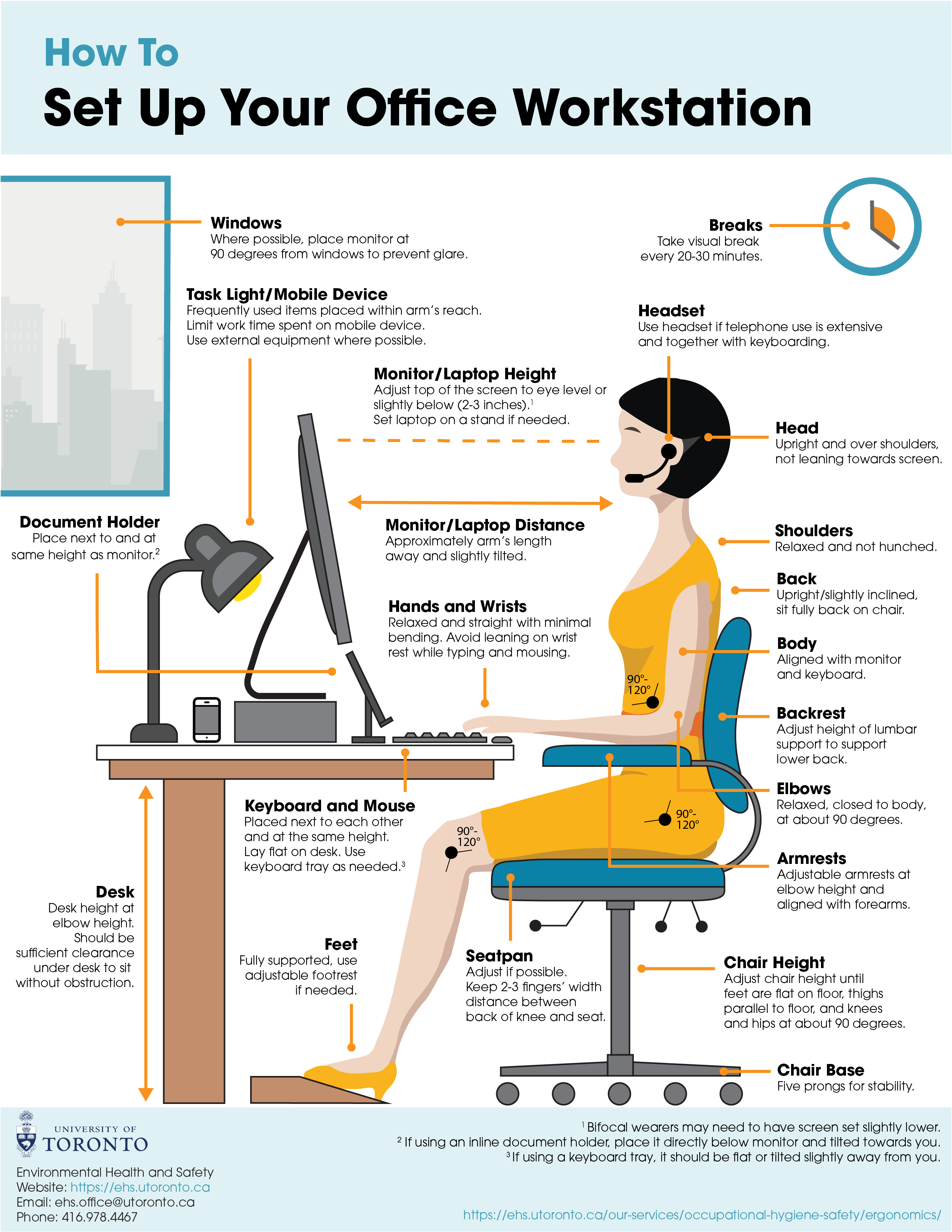
Adjust the chair height so that the elbows are at desk level. Use lumbar support to maintain the natural curve of the lower back, ensuring the weight of the torso is evenly distributed across the chair backrest.
1.3.2 Calibrating Monitor Height and Focal Distance
Position the monitor so that the top third of the screen is at eye level. This prevents the head from tilting forward or backward, significantly reducing the strain on the cervical spine.
1.3.3 Correcting Peripheral Placement for Keyboard and Mouse
Keep the keyboard and mouse within the “primary reach zone,” close to the body to minimize reaching. Wrists should remain in a neutral, straight position rather than extended upward or bent to the side.
1.3.4 Managing Office Environmental Factors like Glare and Noise
Reduce screen glare by positioning monitors perpendicular to windows. Additionally, manage ambient noise through acoustic dampening or noise-canceling technology, as auditory stress often triggers subconscious physical tension in the shoulders and jaw.
2. Advanced Strategies for Long-Term Ergonomic Wellness
2.1 Integrating Routine Practices and Active Habits
Ergonomics is not a one-time adjustment; it is a dynamic process that requires behavioral commitment. Integrating movement into your workday is the most effective way to prevent the micro-traumas associated with static postures. Lifestyle medicine coaching can provide the framework for building these habits, helping you view physical movement as a fundamental pillar of your daily productivity.
2.1.1 The Role of Micro-Breaks and Targeted Stretching
Prolonged sitting restricts blood flow and increases pressure on spinal discs. Micro-breaks—short, 30-second intervals of movement every 30 minutes—act as a reset for your musculoskeletal system. Incorporate targeted stretches that focus on common trouble spots, such as the neck, upper trapezius, and hip flexors. By gently engaging these muscle groups, you mitigate the risk of chronic stiffness.
2.1.2 Applying the 20-20-20 Rule for Digital Eye Strain
Visual fatigue often manifests as tension headaches that radiate into the shoulders. To combat this, follow the 20-20-20 rule: every 20 minutes, shift your gaze to an object at least 20 feet away for at least 20 seconds. This simple habit reduces the accommodative stress placed on your eye muscles during prolonged screen time.
2.1.3 Transitioning Safely Between Sit-Stand Desks and Active Seating
While sit-stand desks are excellent tools for variation, they are often misused. Avoid standing for hours on end, which can cause venous pooling and foot pain. Instead, aim for a gradual transition, alternating between positions every hour. If using active seating—such as balance balls or wobble stools—limit usage to short intervals, as they require significant core engagement that can lead to fatigue if sustained for too long.
2.2 Scaling Ergonomic Solutions Across Diverse Environments
The principles of health-centered workspaces must remain consistent, regardless of your location. Whether you are in a corporate office, a home setup, or working from a hotel, the goal is to maintain neutral biomechanics.
2.2.1 Best Practices for Home Office and Remote Workspace Setups
Remote workers often lack access to professional equipment, leading to makeshift setups that compromise health. Prioritize a dedicated workspace that allows for proper chair height and monitor placement. If you lack a high-end ergonomic chair, use lumbar cushions to maintain the natural curve of your lower back and ensure your feet remain flat on the floor.
2.2.2 Adjusting Ergonomics for Mobile Workers and Frequent Travelers
For mobile professionals, portability is key. Invest in a lightweight, foldable laptop stand and a compact external keyboard and mouse. Elevating your screen to eye level while on the road prevents the “tech neck” posture that is common among travelers working from tablets or laptops at low tables.
2.2.3 Engaging HR and Facility Managers for Corporate Health Programs
Effective ergonomics often requires organizational support. If your office layout causes consistent discomfort, engage with HR or facility management to discuss corporate wellness program implementation. These programs often provide the funding or expertise needed to conduct company-wide assessments and ensure that equipment standards meet safety requirements.
2.3 Tracking Progress and Knowing When to Seek Professional Care
Data-driven wellness ensures that your interventions are actually working. By keeping track of your physical response to environmental changes, you can make informed decisions about your long-term health.
2.3.1 Utilizing Subjective Comfort Surveys for Data Collection
Subjective comfort surveys are excellent tools for identifying patterns in discomfort. By recording where and when you feel strain—such as mid-afternoon lower back pain or evening wrist fatigue—you can correlate specific tasks with physical symptoms and adjust your routine accordingly.
2.3.2 Assessing Long-Term Improvements in Fatigue and Pain Metrics
Monitor your energy levels and pain scores over time. You should notice a decrease in localized tension and an improvement in overall focus as your workstation becomes more supportive. Consistently tracking these metrics helps you justify further improvements to your workspace or recognize when an current setup is failing.
2.3.3 Determining the Threshold for Seeking Clinical Medical Intervention
While ergonomics is a powerful preventive tool, it cannot replace professional medical care for existing injuries. If you experience persistent pain, tingling, numbness, or loss of strength, it is essential to consult a healthcare provider. Identifying the threshold for intervention is critical, as early diagnosis can prevent the progression of repetitive strain injuries and other chronic conditions.
Prioritizing workplace ergonomic health assessments is far more than a simple box-ticking exercise for HR departments; it is a fundamental commitment to the long-term well-being and productivity of your workforce. By systematically addressing the physical demands of the office environment, you empower employees to mitigate the risks of chronic strain and musculoskeletal disorders before they escalate into persistent health challenges. Remember that effective ergonomics is a dynamic, continuous process rather than a one-time adjustment. It relies on the integration of smart, human-centered equipment, the adoption of consistent movement habits, and a supportive culture that values physical health as a pillar of professional success.
As you move forward, consider how these physical workspace improvements align with broader wellness initiatives. Integrating professional lifestyle medicine coaching can bridge the gap between simple office setup changes and the sustained behavioral health habits necessary for lasting vitality. If you notice persistent discomfort despite your best efforts at optimization, do not hesitate to seek guidance from medical professionals who specialize in musculoskeletal health. By fostering an environment where ergonomics, movement, and proactive self-care are prioritized, you are not only safeguarding the physical health of your team but also building a resilient, high-performing organizational culture for the future.