

When a health concern arises, the immediate uncertainty of whether to visit an emergency room, schedule an urgent care appointment, or monitor symptoms at home can be overwhelming. Reliable medical triage guidance is essential for navigating this confusion, ensuring you receive the appropriate level of care at the right time. As the digital healthcare landscape continues to evolve, understanding how to effectively use remote resources has become a critical skill for maintaining personal well-being.
In this guide, we will walk you through the essential steps for assessing your symptoms from home and determining the most effective route for your care. You will learn how to leverage modern tools for a more informed digital symptom assessment, prepare for seamless virtual consultations, and communicate clearly with healthcare professionals. By prioritizing health literacy and patient empowerment, you can transform how you navigate the complex medical system, ensuring that every decision you make is grounded in evidence-based practices rather than guesswork.
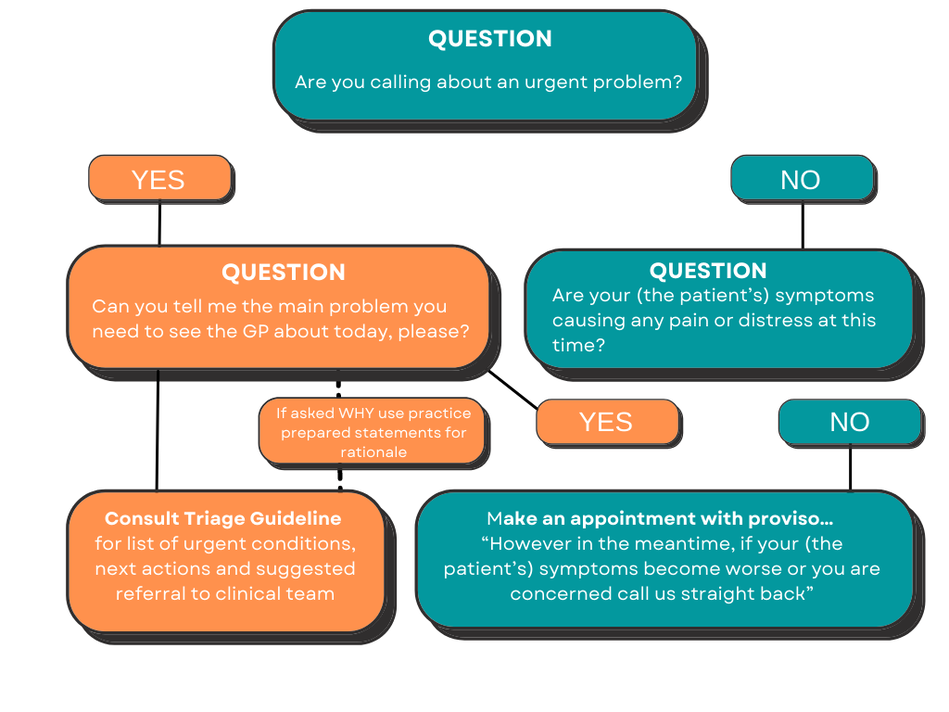
1. Comprehensive Medical Triage Guidance for Digital Health Access
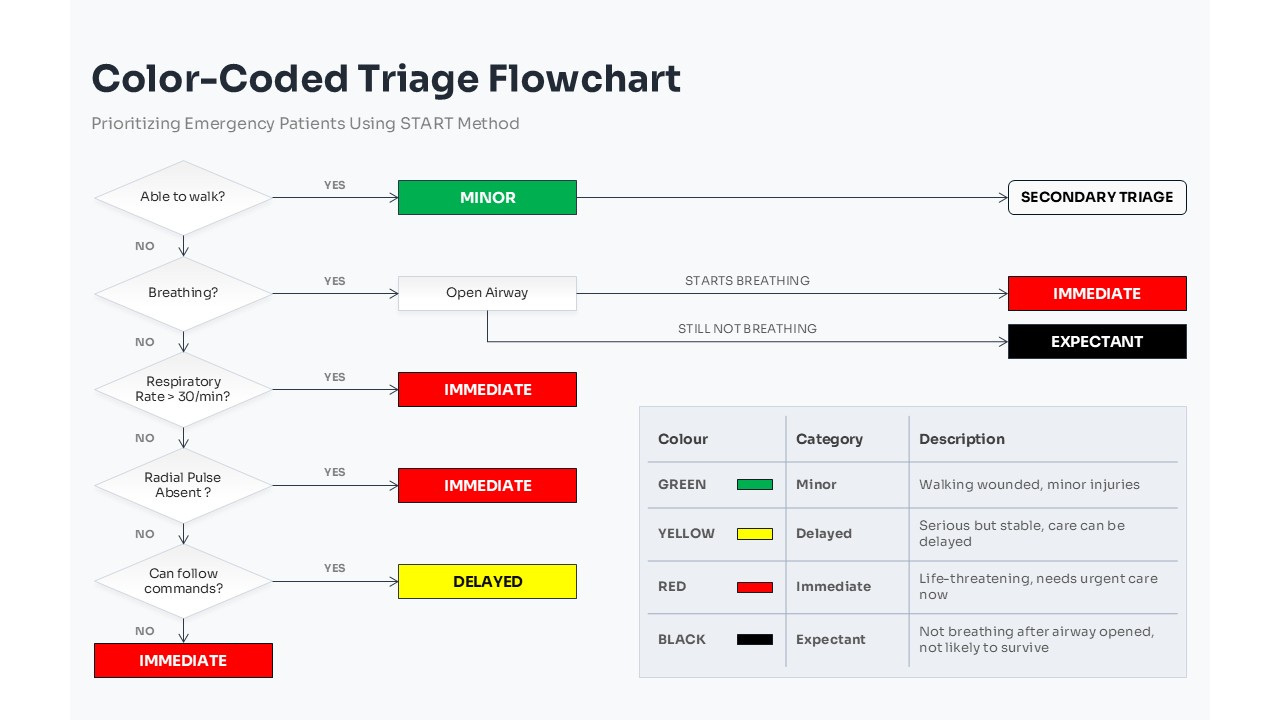
1.1 Defining Virtual Triage and Digital Care Pathways
Virtual triage serves as the critical gatekeeper in modern medicine, acting as the bridge between a patient’s initial concern and the appropriate level of care. By leveraging structured protocols, this process allows healthcare providers to categorize the urgency of a patient’s symptoms before they ever enter a physical clinic. Understanding these pathways is essential for any patient navigating the digital symptom assessment process, as it ensures that resources are allocated based on clinical need rather than simple availability.
1.1.1 The evolution of AI-driven symptom checkers in modern medicine
The landscape of medical triage guidance has shifted significantly with the integration of AI-driven symptom checkers. These sophisticated tools use clinical algorithms to analyze patient-reported data, cross-referencing symptoms against vast databases of medical knowledge. While these checkers have become more accurate, their primary purpose is to guide the user toward the most logical next step—whether that is self-care, a scheduled virtual appointment, or an urgent escalation. They essentially turn subjective feelings into structured data that clinicians can act upon with greater efficiency.
1.1.2 Evaluating the role of digital-first health navigation
Digital-first health navigation prioritizes remote interaction as the entry point for care. This approach emphasizes empowerment and health literacy, encouraging patients to recognize the difference between routine wellness inquiries and acute medical issues. By treating the virtual consultation as the starting point for the patient journey, health systems can maintain continuity of care while reducing the burden on emergency departments for non-emergent issues.
1.2 Determining the Appropriate Level of Care
Knowing when to choose virtual care and when to seek emergency services is a vital skill in evidence-based medical navigation. Because virtual platforms lack the immediate physical diagnostic capabilities of an urgent care center or hospital, patients must be diligent in assessing their own stability.
1.2.1 Identifying non-urgent conditions suitable for virtual consultation
Many common health concerns, such as seasonal allergies, minor skin rashes, or persistent cold symptoms, are perfectly suited for remote interaction. If your symptoms are stable, predictable, and do not involve sudden neurological or cardiac distress, a telehealth visit is often the most efficient pathway. These visits allow for medication management and follow-ups without the logistical challenges of traveling to a clinic.
1.2.2 Recognizing high-risk red flags that mandate immediate emergency intervention
There are instances where virtual triage is insufficient, and immediate in-person care is mandatory. Patients must be aware of “red flags”—symptoms such as chest pain, difficulty breathing, sudden confusion, severe bleeding, or significant facial drooping. These indicators suggest a medical emergency where time is a critical factor. If you suspect any of these high-risk conditions, bypass digital tools entirely and proceed to the nearest emergency department or call emergency services immediately.
1.3 Establishing Safety Protocols for Symptom Assessment
Safety in virtual care relies on recognizing both the utility and the inherent boundaries of remote platforms. While digital triage provides immense convenience, it must be approached with a clear understanding of its role in the healthcare hierarchy.
1.3.1 Why symptom checkers serve as decision-support tools rather than diagnostic replacements
It is important to view symptom checkers as decision-support tools. They provide a probability-based recommendation based on the data you enter, but they cannot replace the nuanced diagnostic judgment of a licensed professional. Relying solely on software for a definitive diagnosis can lead to inaccurate conclusions, which is why these tools are designed to facilitate human contact rather than replace it.
1.3.2 Understanding the limitations of virtual physical examinations
A virtual encounter cannot replicate the tactile physical examination performed by a clinician in person. A physician cannot auscultate your lungs, feel for tenderness in your abdomen, or manually check for swollen lymph nodes through a screen. Because of these limitations, virtual care is often most effective for managing known conditions, reviewing test results, or addressing symptoms that do not require physical touch. Always prepare for the possibility that your clinician may recommend an in-person follow-up if a physical exam is necessary to confirm a diagnosis.
2. Executing a Successful Virtual Consultation and Care Strategy
2.1 Practical Preparation for Optimized Telehealth Interactions
Maximizing the efficiency of your virtual care visit begins long before you connect to the video link. Proper preparation ensures that your clinician can focus on your health status rather than administrative gaps.
2.1.1 Organizing clinical data including medication lists and health history
To facilitate a productive session, gather your essential health data in one place. This should include an up-to-date list of current medications—including dosages and frequencies—as well as any known allergies. Having your recent immunization records and a summary of chronic conditions ready allows you to provide accurate information quickly, supporting optimizing the telehealth patient journey by minimizing time spent on basic data entry during your appointment.
2.1.2 Configuring the technical environment for secure and high-quality video sessions
Test your technology at least fifteen minutes before your scheduled start time. Ensure you have a stable high-speed internet connection and that your device is fully charged. Verify that both your microphone and camera are granted the necessary permissions in your browser or application. Using a wired internet connection rather than public Wi-Fi can significantly reduce the risk of lag or dropped connections during sensitive clinical discussions.
2.1.3 Establishing a private and well-lit physical space for accurate visual assessment
Select a quiet room where you can speak openly without interruption. Proper lighting is essential; position yourself so that a light source is in front of you, rather than behind, to ensure the provider can clearly visualize physical symptoms, such as rashes, swelling, or skin color changes. A private environment not only protects your personal health information but also helps you feel comfortable discussing sensitive concerns.
2.2 Navigating the Clinician-Patient Encounter
2.2.1 Utilizing the OPQRST method to provide precise symptom descriptions
Communicating your symptoms clearly is vital for evidence-based medical navigation. Use the OPQRST framework to structure your answers: Onset (when did it start?), Provocation (what makes it better or worse?), Quality (how does it feel—is it sharp, dull, or aching?), Radiation (does the pain move?), Severity (on a scale of 1-10), and Timing (is it constant or intermittent?). This approach provides the clinician with structured data, leading to a more accurate digital symptom assessment.
2.2.2 Clarifying treatment plans and pharmacy coordination requirements
Before ending the call, ensure you fully understand the next steps. Ask the provider to repeat any instructions regarding new prescriptions, follow-up testing, or lifestyle modifications. Confirm exactly which pharmacy your electronic prescription will be sent to, and inquire about how to access your digital care summary if the system provides one.
2.2.3 Implementing backup communication protocols for technical failures
Technical glitches are an inherent part of digital medicine. Agree upon a secondary communication method with your provider at the start of the session, such as a direct phone line or a secure patient portal messaging system. Having a “Plan B” reduces stress, allowing you to focus on your health rather than troubleshooting connectivity issues.
2.3 Post-Consultation Continuity and Follow-Up Actions
2.3.1 Interpreting digital care summaries and discharge instructions
After your consultation, review your electronic discharge summary carefully. These documents often contain crucial details about medication interactions and warning signs that require urgent attention. If a term or instruction is unclear, use your clinic’s patient portal to send a clarifying question to the care team rather than guessing at the meaning.
2.3.2 Managing clinical escalation when symptoms persist or deteriorate
Virtual care has distinct boundaries. If your symptoms worsen despite following the agreed-upon treatment plan, do not wait for the next scheduled follow-up. Recognize the “red flags”—such as shortness of breath, sudden confusion, or severe chest pain—that signal you need to transition from virtual guidance to emergency in-person care immediately.
2.3.3 Synchronizing virtual care notes with primary care provider medical records
To ensure continuity of care, take proactive steps to share your virtual visit summary with your primary care provider (PCP). If your virtual provider does not automatically send notes to your PCP, save the electronic file and forward it via your patient portal. This synchronization is essential for maintaining a holistic view of your health history.
2.4 Addressing Systemic Barriers to Effective Care
2.4.1 Navigating insurance coverage and out-of-pocket costs for digital visits
Before your appointment, verify whether your specific insurance plan covers the virtual service. Reach out to your provider’s billing department or check your insurer’s website to understand co-pays or deductibles. Being aware of potential out-of-pocket costs prevents surprise billing and allows you to make informed decisions about your care options.
2.4.2 Ensuring compliance and privacy in electronic health information exchange
Only utilize virtual care platforms that are HIPAA-compliant and explicitly state their commitment to data security. Avoid using unsecured public networks or non-private video platforms for medical consultations. By prioritizing encrypted channels, you protect your sensitive health data and ensure that your interactions meet established privacy standards for electronic information exchange.
Navigating the modern healthcare landscape can feel overwhelming, but mastering the principles of medical triage guidance empowers you to take control of your health journey. By understanding the distinction between non-urgent consultations and high-risk scenarios, you ensure that you receive the right care at the right time. Remember that digital tools and symptom checkers are designed to serve as supportive resources for evidence-based medical navigation rather than final diagnostic replacements. Preparation remains your strongest asset; by organizing your health history and clearly communicating your symptoms, you create a more efficient and effective experience for both yourself and your clinician.
As you continue to refine your approach to virtual health, staying informed about your options is key to maintaining long-term wellness. For a deeper understanding of how to make the most of your remote interactions, explore our expert medical advice for navigating your virtual health care to ensure you are always prepared. Proactive management of your clinical records and clear communication with your primary provider will help maintain continuity of care, even when symptoms evolve. Ultimately, informed patients are better equipped to advocate for their health, ensuring that every virtual visit leads to the best possible outcome.